

Appearance
Document types
Last updated 23 Nov 2026
- Who can do this: Workspace owner. Anyone with edit access to a file can set its type
- Feature needed: Document classification, to set a file's type
- Where: HelloDocz → Document Type
A document type is a kind of document your workspace handles, e.g. Invoice or Receipt, with the data you expect in it. When a file has a type, its data is suggested as fields to fill in.
Create a document type
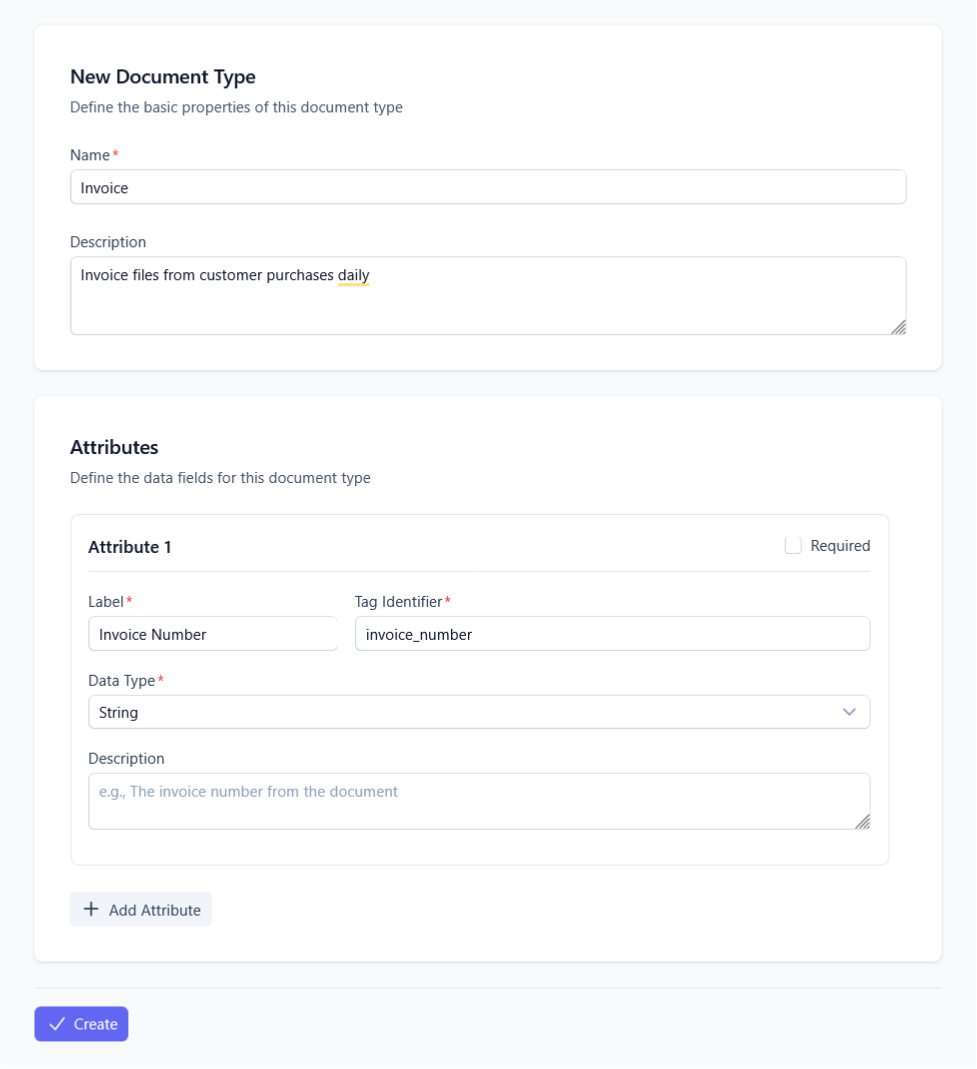
- In HelloDocz, click Document Type, then New Document Type.
- Enter a Name, e.g. Invoice, and a Description if you like.
- Under Attributes, fill in the first piece of data you expect, e.g. the invoice number:
- Label: its display name, e.g. Invoice Number.
- Tag Identifier: the same name without spaces, e.g.
invoice_number. This is the field name files get. - Data Type: String for text, or Number, Decimal, Date, Boolean (yes or no), Array or JSON.
- Required: tick it if every document of this type has this value.
- Click Add Attribute for each other piece of data, e.g. Invoice Date and Total.
- Click Create.
Assign type to file
- One file: open the file's page, click the pencil next to Document type, choose a type and click Save. You can also click Add new type there to create one.
- All new files in a folder: set the folder's default document type.
Good to know
- Attributes become field suggestions. When you add a field to a file with this type, its attributes are suggested in the Field box by their Tag Identifier, e.g.
invoice_number. Pick one and type its value. This keeps field names the same across files, so searching by field finds them all.