

Appearance
Billing and usage
Last updated 23 Nov 2026
- Who can do this: The organization's owner
- Where: Settings menu → Billing
Your subscription covers everyone in your organization, in every workspace.
Seats
Your plan is priced per seat, and the seat count includes you, the owner. A seat is one person with ongoing access to your organization.
| Takes a seat | Doesn't take a seat |
|---|---|
| You, the owner | Guests |
| Each member | |
| Each member invitation that hasn't been accepted yet |
For example, you plus 4 members plus 1 pending member invitation need 6 seats. Guests can be added on top without buying more.
Choose a plan
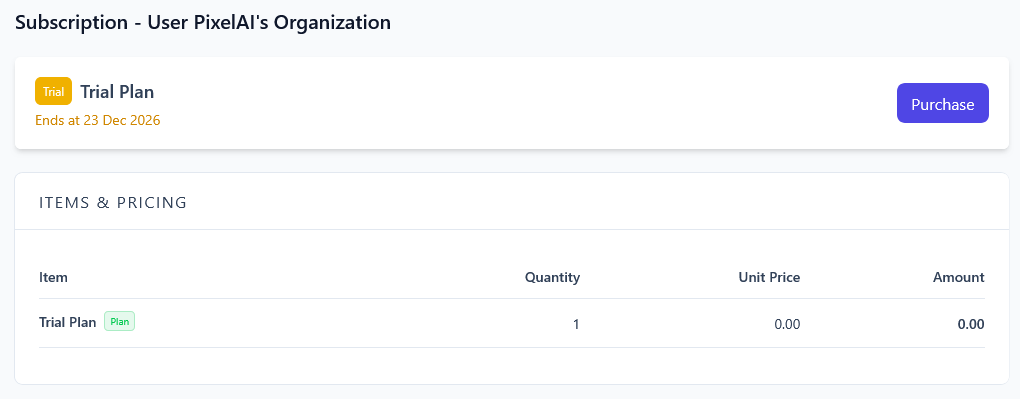
- Click Purchase.
- Under Subscription Plans, pick Monthly or Yearly on the plan you want.
- Set the Member Count: the number of seats, including yours.
- Click Purchase Plan and enter your card details on the payment page.
Buying a plan during the free trial ends the trial straight away. Your files stay as they are.
Change your plan or seats
Click Modify Plan to change the Billing interval or Member count.
- More seats: available straight away. You're charged a prorated amount for the rest of the billing period.
- Fewer seats: take effect at the start of your next billing period. You can't go below the seats in use, so change some members to guests or remove them first.
Add-ons
Add-ons give your organization more of an allowance, e.g. extra AI tokens or storage.
- Purchase Addon: billed every month with your subscription, prorated if you buy it mid-period.
- Manage Addons: reduce or remove one. The change takes effect at the end of the billing period.
Usage
Everyone in your organization shares the same allowances, across all workspaces and including guests. The Dashboard and Billing page show how much is used this billing period.
| Allowance | What uses it |
|---|---|
| Cloud Storage | All files in all your workspaces |
| AI Tokens | AI Chat answers and AI summaries |
| Email Sent | Emails sent from HelloDocz |
| Hellodocz Transaction Data Extraction | Pages of extracted documents |
| OCR Pages | Pages read with OCR |
Click View breakdown to see who used what, By person or By workspace.
Example: how sharing works. Say your plan has 100 OCR pages a month, and you have two workspaces:
| Who | Where | Uses |
|---|---|---|
| Ana (member) | Finance | 70 pages, indexing scanned invoices |
| Ben (guest) | HR | 30 pages, indexing signed contracts |
| Left for everyone | 0 pages |
Now nobody in the organization can use OCR until the next billing period or an add-on. Ana's next scanned PDF is indexed without OCR, even though she works in a different workspace from Ben. Allowances aren't split per person or per workspace.
When an allowance runs out, only the actions that use it stop, and PixelAI says which allowance is used up. Storage frees up when files are deleted. The others start again next billing period, or you can buy an add-on.
Cancel your subscription
Click Cancel Subscription. It stays active until the end of the billing period, and the Billing page shows the date.
When the subscription ends, nobody in your organization can open HelloDocz or AI Chat. Download anything you need first.