

Appearance
Audit logs
Last updated 23 Nov 2026
- Who can do this: Anyone, for the workspaces they're in
- Where: Settings → Audit Logs
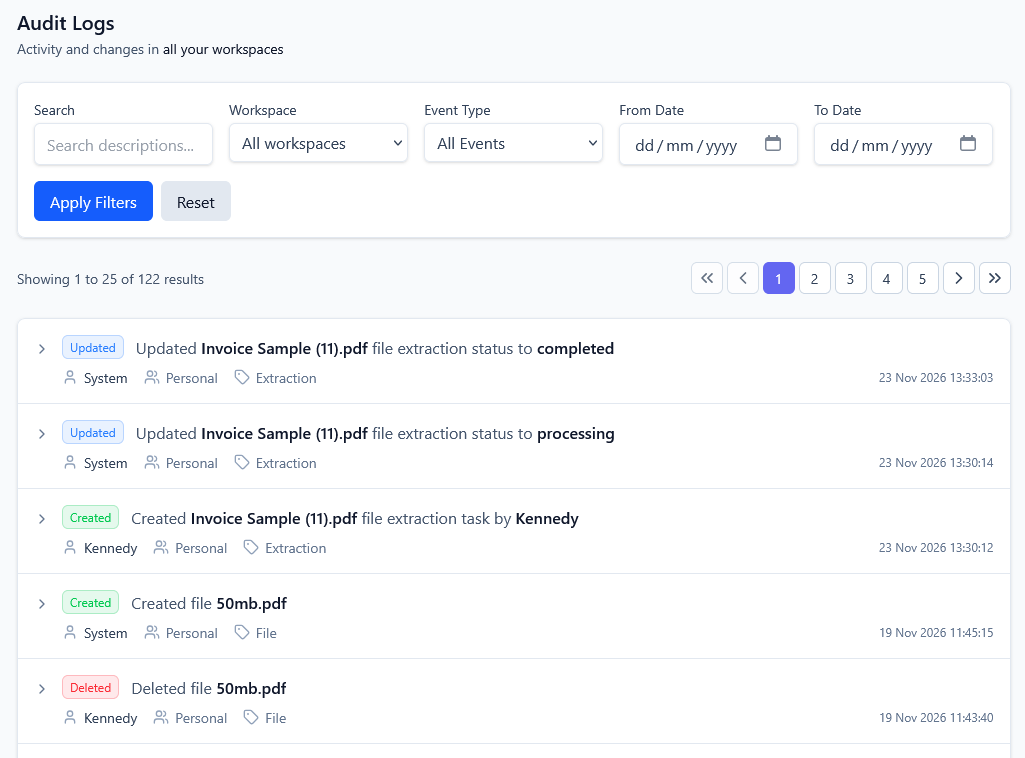
The audit log is a record of what was created, changed and deleted, by whom and when: files and folders, sharing, members, workspace settings and more. Use it to find out what happened to a file, or who changed a setting.
Find an entry
Use the filters at the top, then click Apply Filters:
| Filter | What it does |
|---|---|
| Search | Finds words in the description, e.g. a file name |
| Workspace | One workspace, or All workspaces you're in, in this organization |
| Event Type | Created, Updated, Deleted or Restored |
| From Date / To Date | Only entries between these dates |
Each entry shows who did it, when, in which workspace, and what changed.
Good to know
- The log covers the organization of the workspace you're in. Switch workspace to see another organization's.
- To see the history of a single file, open its details → Activity.