

Appearance
Send files by email
Last updated 23 Nov 2026
- Who can do this: Anyone in the workspace
- Feature needed: Email files
- Where: A file's menu → Send Email
Send files to anyone, including people who don't use PixelAI, without downloading them first.
Steps
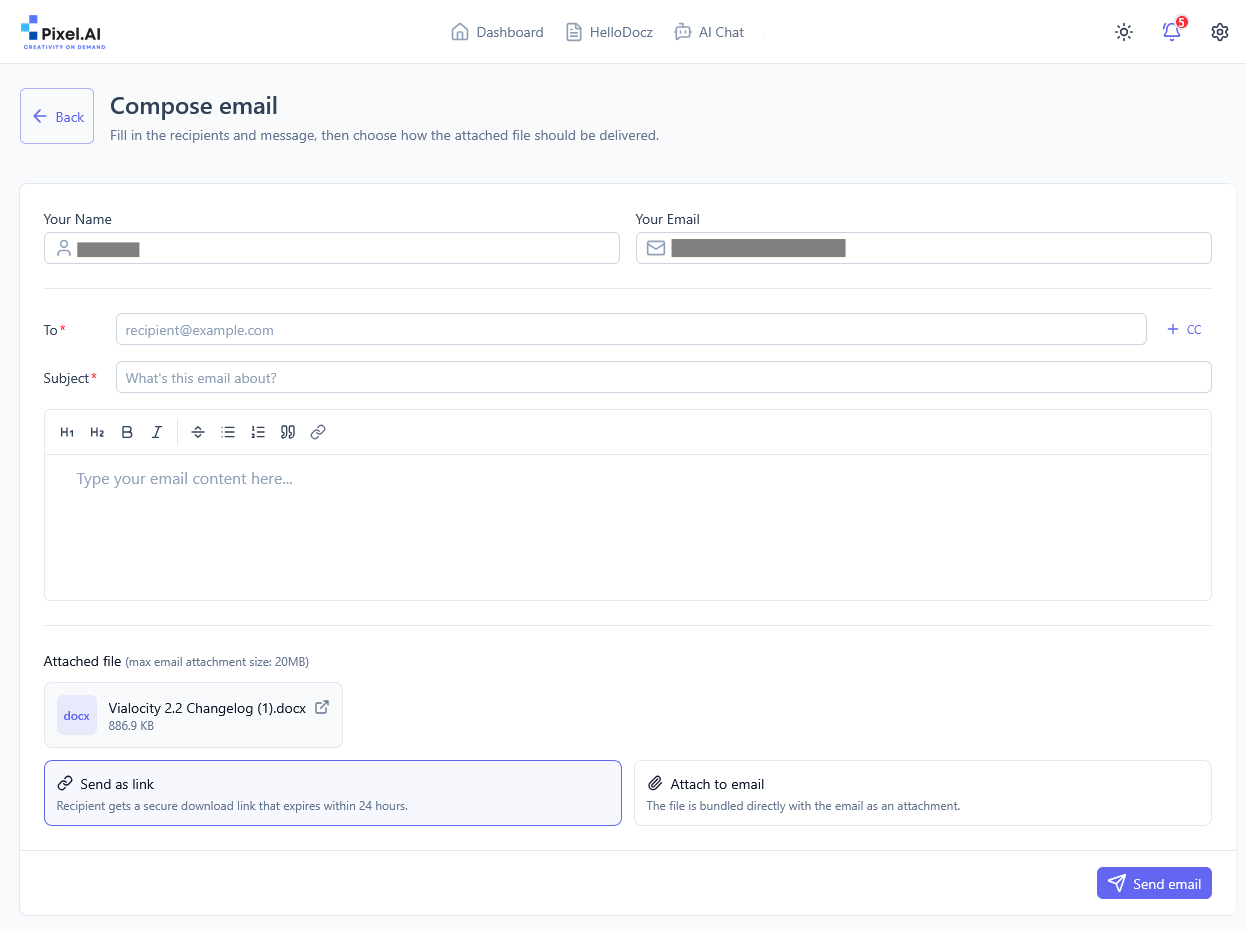
- Choose Send Email from a file's menu. To send several files, tick them and choose ⋯ → Email.
- Check Your Name and Your Email. Replies go to this address.
- Enter the recipients in To. Click Cc to copy others in.
- Enter a Subject and your message.
- Choose how to send the files:
- Send as link: the email has a secure download link. The link stops working after 24 hours.
- Attach to email: the files are attached to the email. Attachments can be up to 20 MB in total.
- Click Send email.
Good to know
- Use Send as link for large files, or when you'd rather the files didn't sit in someone's inbox.
- Each email counts towards your plan's email allowance. See Billing and usage.